

Built for IC Engineers
- New hires and early-career IC engineers (0–3 years) at Canadian semiconductor companies
- Final-year MSc/PhD students seeking IC design job readiness
- Industry professionals seeking structured upskilling in digital IC physical design
Course Overview
This back-end digital IC design course focuses on the physical implementation flow used in ASIC development. Participants will gain practical exposure to floorplanning, power planning, placement, clock tree synthesis, routing, timing closure, and signoff methodologies using industry-standard implementation tools.
Developed with input from Canadian semiconductor employers and the Industry Training Advisory Group (ITAG).
Important Notes
- Training participants will have access to other proprietary and confidential information during the course; each participant is required to agree to the terms of the Access to Intellectual Property & Non-Disclosure Agreement at the time of registration.
- Cloud-hosted CAD/EDA tools provisioned by CMC Microsystems. No local installation required. Additional software license terms and conditions apply.
- Restrictions apply. As per the terms of the Cadence SOFTWARE LICENSE AND MAINTENANCE TERMS AND CONDITIONS FOR TIME BASED PRODUCT LICENSES, plus related Academic Use addenda (if applicable), use of the Cadence software is restricted to authorized third parties and excludes any competitors of Cadence. Compliance with the terms is required when accessing the CAD/EDA tools.
Prerequisites
- Basic digital logic & computer architecture
- Introductory HDL familiarity (beneficial)
- No prior EDA experience required
What You Will Learn
- Understand the complete ASIC back-end implementation flow from netlist to GDSII
- Perform floorplanning, placement, clock tree synthesis, and routing tasks
- Interpret static timing analysis reports and apply timing closure techniques
- Run DRC/LVS physical verification and equivalence checks
- Contribute to physical design and implementation activities within digital IC teams
Topics Covered
- ASIC physical implementation flow overview
- Floorplanning and macro placement strategies
- IO planning and power distribution networks
- Standard cell placement and optimization
- Clock tree synthesis and clock distribution
- Signal routing and congestion analysis
- Static timing analysis and timing closure
- Physical verification: DRC/LVS and equivalence checking
Weekly Schedule
Week | Lecture | Lab |
Week 1 | Wed, Sept. 9 — 13:00–15:00 EDT | Mon, Sept. 14 — 13:00–14:00 EDT |
Week 2 | Wed, Sept. 16 — 13:00–15:00 EDT | Mon, Sept. 21 — 13:00–14:00 EDT |
Week 3 | Wed, Sept. 23 — 13:00–15:00 EDT | Mon, Sept. 28 — 13:00–14:00 EDT |
Week 4 | Wed, Sept. 30 — 13:00–15:00 EDT | Mon, Oct. 5 — 13:00–14:00 EDT |
Week 5 | Wed, Oct. 7 — 13:00–15:00 EDT | Mon, Oct. 12 — 13:00–14:00 EDT |
Week 6 | Wed, Oct. 14 — 13:00–15:00 EDT | Mon, Oct. 19 — 13:00–14:00 EDT |
Week 7 | Wed, Oct. 21 — 13:00–15:00 EDT | Mon, Oct. 26 — 13:00–14:00 EDT |
Week 8 | Wed, Oct. 28 — 13:00–15:00 EDT | Mon, Nov. 2 — 13:00–14:00 EDT |
Course | Lecture | Lab |
Digital IC Physical Design | Wednesday 13:00-15:00 EDT | Monday 13:00-14:00 EDT |
Outcomes
- Execute an end-to-end ASIC physical implementation flow from netlist to GDSII
- Apply floorplanning, placement, and clock tree synthesis in a professional EDA environment
- Analyze and close timing using static timing analysis (STA) tools
- Run DRC, LVS, and equivalence checks to achieve physical signoff
- Contribute to physical design and back-end implementation activities within digital IC teams
Equipment Requirements
- Windows, macOS, or Linux laptop
- Stable high-speed internet connection
- Modern web browser: Chrome, Edge, Firefox, or Safari
- VPN / SSH / Remote Desktop / VNC access, if required
- 8 GB RAM minimum, 16 GB recommended
- Power adapter for full-day training
Instructor

François Leduc-Primeau
Associate Professor at Polytechnique Montreal
Lead Instructor
François Leduc-Primeau is an IVADO Associate Professor at Polytechnique Montreal. He obtained his Ph.D. degree in 2016 from McGill University, and from 2016 to 2018 held postdoctoral positions at IMT Atlantique in France and École de technologie supérieure in Montreal.
His research interests span digital system design, telecommunications, error-correction codes and machine learning, with applications in advanced communication systems, energy-efficient AI, and other low-energy digital systems. He is the co-director of the GRM research lab and an Associate Editor for IEEE Transactions on Signal Processing.
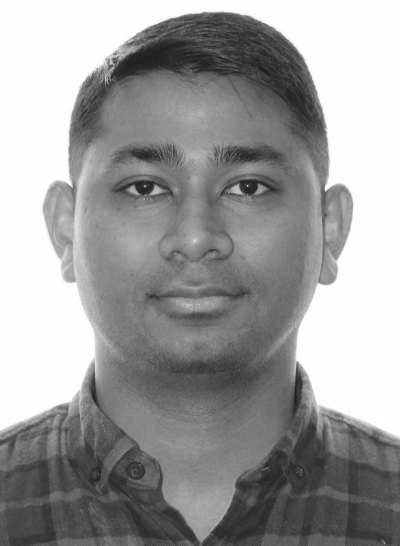
Yugal Kishore Maheshwari
Lab Instructor
Yugal Kishore Maheshwari received the Ph.D. degree (specialization in VLSI) in March 2025 and the M.A.Sc. degree (specialization in Computer Hardware) in August 2020, both in Electrical and Computer Engineering, from the University of Waterloo.
He has been a Member of Technical Staff with the Microelectronics Team at CMC Microsystems since April 2023, where he supports advanced semiconductor design technologies and ASIC fabrication services for academic and industrial users.
He is a Senior Member of IEEE. His research interests include low-power, low-voltage, and energy-efficient digital integrated circuits, soft-error-tolerant and reliable circuit design, and hardware security.


